

If your TCL TV is not connecting to WiFi, it can be frustrating. There are several reasons why this issue might occur.
In this post, we will explore common causes and solutions to help you get your TV back online. Many TCL TV owners face WiFi connectivity problems. These issues can stem from both hardware and software problems. Understanding the root cause can save time and hassle.
Sometimes, the fix is simple, like adjusting settings. Other times, it might involve a more technical approach. By addressing these common issues, you can enjoy uninterrupted streaming and online content. Let’s dive into the possible reasons and solutions for your TCL TV’s WiFi connection problems.
Common Connection Issues
Having trouble connecting your Tcl TV to WiFi? You’re not alone. Many users face common issues that prevent their TV from connecting to the internet. Understanding these problems can help you find solutions quickly.
Network Problems
One frequent issue is network problems. The WiFi signal might be weak. Routers placed far from the TV can cause weak connections. Interference from other devices can also disrupt the signal. Ensure your router is close to the TV. Reduce the number of devices connected to the WiFi.
Hardware Failures
Another problem could be hardware failures. The TV’s internal WiFi adapter might be faulty. If the TV is old, the hardware might wear out. Sometimes, software updates can fix these issues. But, if the hardware is damaged, you may need professional help.
Credit: www.youtube.com
Preliminary Checks
Check if your Tcl TV’s WiFi is turned on. Ensure the router is within range and functioning properly. Verify that the TV’s software is up to date.
When your Tcl TV doesn’t connect to WiFi, it can be incredibly frustrating. You might miss out on your favorite shows or have trouble streaming. But don’t worry, there are some preliminary checks you can perform to troubleshoot this issue. Let’s dive into some practical steps to get your Tcl TV back online.###Verify Wifi Signal
First, check the strength of your WiFi signal. A weak signal can be the culprit.Move closer to your router if possible. Thick walls and other electronic devices can interfere with the signal.You can also use a smartphone to test the signal strength near your Tcl TV. If the signal is weak, you might need a WiFi extender to boost it.###Check Router Settings
Another thing to check is your router settings. Sometimes, a simple reboot can fix connectivity issues.Turn off your router, wait for 30 seconds, and turn it back on. This can resolve temporary glitches.Ensure that your router’s firmware is up to date. Outdated firmware can cause compatibility issues.Double-check that your WiFi password is correct. A simple typo can prevent your TV from connecting.Are there any devices hogging the bandwidth? Disconnect some devices to see if that improves the connection.By following these preliminary checks, you can often resolve WiFi connectivity issues with your Tcl TV. Have you tried these steps yet? Which one worked for you?Restart Devices
Sometimes, your Tcl TV may not connect to WiFi due to minor glitches. Restarting your devices can often resolve these issues. This simple step can refresh the system and clear temporary bugs. Let’s dive into the steps to restart your TV and router to get your Tcl TV back online.
Reboot Tv
First, unplug your Tcl TV from the power outlet. Wait for about 60 seconds. This allows the TV to reset fully. Plug the TV back in and turn it on. Navigate to the settings menu and try reconnecting to WiFi. Rebooting your TV can often clear minor software issues.
Restart Router
Next, focus on your router. Unplug the router from the power source. Wait for at least 60 seconds. Plug the router back in and wait for it to restart. This can take a few minutes. Once the router is back online, try connecting your Tcl TV to the WiFi again. Restarting the router can help fix connectivity problems.
Credit: www.youtube.com
Update Firmware
Updating the firmware on your TCL TV can solve many connectivity issues. Firmware updates improve your TV’s performance and fix bugs. If your TCL TV is not connecting to WiFi, updating the firmware might help. Here’s how you can do it.
Check For Updates
First, check if there is a new firmware update available. Go to the settings menu on your TCL TV. Select ‘System’ and then ‘Software Update’. The TV will scan for available updates.
If an update is available, you will see a notification. Make sure your TV is connected to the internet during this process. If there is no update available, you might need to troubleshoot further.
Install Latest Version
If an update is available, select ‘Download and Install’. The TV will start downloading the update. This might take a few minutes, depending on your internet speed.
Once the download is complete, the TV will prompt you to install the update. Confirm by selecting ‘Install’. The TV will restart during the update process. Do not turn off the TV while it’s updating.
After the update, your TCL TV should have better connectivity. If it still doesn’t connect to WiFi, you might need to explore other solutions.
Network Settings
Having trouble with your TCL TV’s network settings? You’re not alone. Many TCL TV users face issues with WiFi connectivity. This guide will help you understand why your TCL TV isn’t connecting to WiFi and how to fix it.
Reset Network Configuration
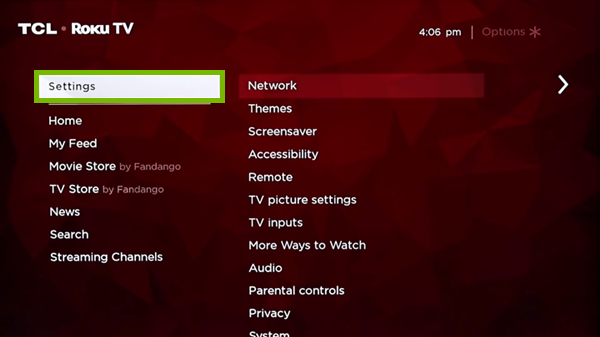
Sometimes, your network settings might be the culprit. A simple reset can do wonders. Navigate to your TV’s settings menu and find the network option. Select “Reset Network Configuration”. This action will clear any saved networks and reset the network settings to default.
After the reset, you’ll need to reconnect to your WiFi. Think of it as giving your TV a fresh start. Just like rebooting a computer can solve many issues, resetting the network configuration can help your TCL TV connect to WiFi again.
Re-enter Wifi Password
Another common issue is an incorrect WiFi password. Double-check your credentials. Entering the wrong password can prevent your TV from connecting. Go to the network settings and select your WiFi network.
Make sure you type in the exact password. Pay attention to case sensitivity and special characters. If you’re unsure, look at the password on your router or ask your internet service provider. A small typo can make a big difference.
By carefully resetting your network configuration and re-entering your WiFi password, you can solve many connectivity issues. Have you tried these steps? What other solutions have worked for you? Share your experience in the comments below!
Interference Issues
When your TCL TV isn’t connecting to WiFi, interference issues could be the culprit. They can disrupt the signal between your router and TV. This can be incredibly frustrating, especially when you’re ready to binge-watch your favorite show.
Identify Signal Interference
First, identify whether there are any devices causing interference. Common household items like microwaves, cordless phones, and baby monitors can disrupt WiFi signals. Even your neighbor’s WiFi network could be interfering.
Check for physical barriers too. Walls, floors, and large metal objects can weaken the signal. Are there any large objects between your router and TV? These could be the source of your problem.
Relocate Tv Or Router
Next, try relocating either your TV or your router. Moving them just a few feet can make a significant difference. Think about where your devices are placed in your home. Are they in separate rooms or on different floors?
Consider placing your router in a central location. This can help distribute the signal more evenly throughout your home. If your TV is in a corner or against a wall, try moving it to a more open space.
Have you ever experienced signal interference? How did you resolve it? Share your tips in the comments below. Your experience could help others facing the same issue.
Advanced Troubleshooting
When your Tcl TV stubbornly refuses to connect to WiFi, basic troubleshooting steps might not cut it. That’s when you need to explore advanced troubleshooting methods. In this section, we’ll delve into two effective strategies that can resolve persistent connectivity issues: performing a factory reset and using an ethernet connection. Let’s dive in.
Factory Reset
A factory reset can solve a myriad of connectivity problems. It wipes out all settings and restores your TV to its original state. This can eliminate software glitches that might be preventing your TV from connecting to WiFi.
Before you start, remember to note down any custom settings or preferences. Once you reset, you will need to set up your TV from scratch. Here’s how to do it:
- Go to the Settings menu on your Tcl TV.
- Select System and then Advanced System Settings.
- Choose Factory Reset and follow the on-screen instructions.
After the reset, reconnect to your WiFi network. This fresh start often resolves connectivity issues. Have you ever tried a factory reset on any device? It’s like hitting the reset button on a stubborn problem.
Use Ethernet Connection
If WiFi still doesn’t work, consider using an ethernet connection. Ethernet provides a stable, wired connection that can bypass many WiFi issues. All you need is an ethernet cable and access to your router.
Plug one end of the cable into your TV and the other into the router. This direct connection can significantly improve your internet experience. You might be surprised at how much faster and more reliable the connection becomes.
Ethernet connections are especially useful if your router is located far from your TV. WiFi signals can weaken over distance and obstacles, but a wired connection maintains full strength. Have you ever noticed how your laptop works better when plugged into the router?
By trying these advanced troubleshooting steps, you can overcome persistent connectivity issues. Don’t let a minor technical hiccup ruin your viewing experience. Have you found other methods that worked for you? Share your experiences in the comments below!
Contact Support
Sometimes, despite all efforts, your Tcl TV still won’t connect to WiFi. This can be incredibly frustrating. In such cases, contacting support might be the best solution. Here, we will discuss how to reach out to TCL support and seek professional help.
Reach Out To Tcl Support
TCL provides excellent customer support for their products. You can contact them via phone, email, or live chat. Visit the official TCL website and navigate to the support section. There, you will find various options to connect with a representative.
Before contacting, gather all relevant information about your TV. This includes the model number, purchase date, and a detailed description of the issue. This information will help the support team assist you more effectively.
Seek Professional Help
If contacting support doesn’t solve the issue, consider seeking professional help. A qualified technician can diagnose and fix the problem. Check if your TV is still under warranty. If it is, repairs might be covered.
Professional help ensures the problem is addressed correctly. It can save you time and prevent further damage to your TV. Look for certified repair services in your area. Always ensure they have experience with TCL products.
Credit: www.techsolutions.support.com
Frequently Asked Questions
Why Won’t My Tcl Tv Connect To My Wi-fi?
Your TCL TV may not connect to Wi-Fi due to incorrect settings, network issues, or outdated firmware. Restart both devices.
Why Is My Smart Tv Suddenly Not Connecting To Wi-fi?
Your smart TV may not connect to Wi-Fi due to router issues, software glitches, network interference, or incorrect settings. Restart both the TV and router, check network settings, and ensure the firmware is updated. If the problem persists, contact support for further assistance.
Why Is My Wi-fi Suddenly Not Connecting?
Your Wi-Fi might not be connecting due to router issues, outdated firmware, network interference, or incorrect settings. Restart your router and device.
Why Is My Tcl Tv Connected To The Internet But Apps Not Working?
Your TCL TV may have outdated firmware, app glitches, or network issues. Restart your TV and router, and update firmware.
Conclusion
Tcl TV not connecting to WiFi can be frustrating. Follow the steps mentioned. Check your internet connection and router settings. Resetting the TV often helps. Ensure your software is up-to-date. Sometimes, simple fixes solve the issue. If problems continue, contact customer support.
They can provide specific solutions. Remember, a stable internet connection is key. Enjoy your streaming without interruptions. Happy viewing!

“I’m someone who loves trying out all the newest tech gadgets! I spend a lot of time testing things like phones, tablets, and computers & accessories. I look at everything carefully and tell you exactly what I think, good or bad. I’ve been doing this for a long time, so I know a lot about how these things work. I want to help you decide if a gadget is really worth your money!”