

A clicking sound from your Western Digital hard drive can be worrying. It often signals a problem that needs fixing soon.
This guide will help you understand and resolve this issue. Hard drives are crucial for storing important data. A clicking sound usually means the drive is struggling to read or write data. This can be due to physical damage, firmware issues, or mechanical failure.
Knowing how to fix it can save your data and restore your drive’s functionality. In this post, we will explore the common causes and provide clear steps to fix your Western Digital hard drive. Stay with us to learn how to protect your data and get your drive back in working order.
Introduction To Western Digital Hard Drive Clicking
Western Digital hard drives sometimes make clicking sounds. This often signals a problem. Learn how to fix it quickly and keep your data safe.
Western Digital hard drives are popular for their reliability. Sometimes, these drives may make clicking sounds. This noise can be alarming. It usually indicates a problem. Knowing why your hard drive clicks is important.Common Causes
There are several reasons your Western Digital hard drive might click. One common cause is a mechanical failure. The read/write head inside the drive may get stuck. Another cause is power supply issues. If the drive isn’t getting enough power, it might click. Bad sectors on the drive can also cause clicking sounds. These sectors prevent the drive from reading data properly.Potential Risks
Clicking sounds can indicate serious risks. Your data could be at risk. If the drive fails completely, you might lose important files. Clicking can also mean the drive is close to failure. This makes it hard to access your data. Ignoring the clicks can lead to more damage. It’s best to act quickly to avoid further issues. “`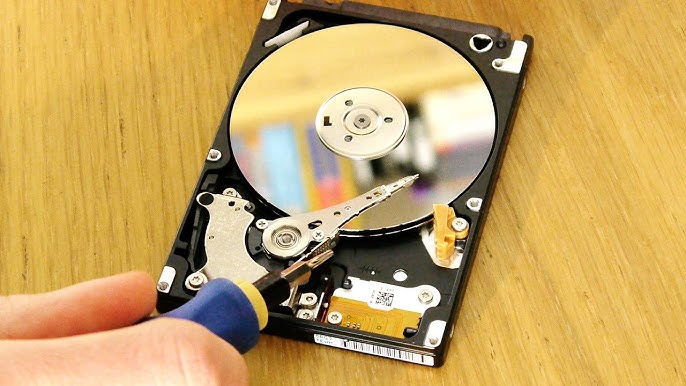
Credit: www.youtube.com
Immediate Steps To Take
To fix a Western Digital hard drive clicking, first disconnect and reconnect the drive. Next, check the power supply. Finally, use a data recovery tool to safeguard your files.
When your Western Digital hard drive starts clicking, it can be quite alarming. This sound often indicates a mechanical issue, and immediate action is crucial to prevent data loss. Taking the right steps quickly can make all the difference.###Power Off The Drive
The first thing you need to do is power off the drive.If your hard drive is still running, continuing to operate it can cause more damage. Simply turn off your computer or unplug the external drive.I once had a drive that started clicking, and I kept it running, hoping it would fix itself. Big mistake. The data became irrecoverable. So, learn from my mistake—shut it down immediately.###Disconnect Safely
Next, disconnect the hard drive safely.If it’s an external drive, use the “Safely Remove Hardware” option on your computer. This ensures that all processes using the drive are halted properly.Pulling out the drive abruptly can make things worse. Think of it like yanking a USB stick out without ejecting it first. It’s a small step that can save you a lot of headaches.Have you ever wondered why your drive might start clicking? It could be anything from a power issue to mechanical failure. Addressing it promptly can help you get to the bottom of it more efficiently.Taking these immediate steps can protect your data and give you a better chance of recovering it. What’s the most important thing you’ve learned about handling hard drives? Share your thoughts in the comments!Diagnosing The Clicking Sound
A clicking sound from a Western Digital hard drive often signals mechanical issues. Fixing it might involve checking power connections and using data recovery software.
Western Digital hard drives are known for their reliability. But, like all hardware, they can sometimes have issues. One common problem is a clicking sound. This sound can be a sign of a bigger problem. Knowing how to diagnose it can save you time and money.Identifying The Pattern
First, listen closely to the clicking sound. Is it constant, or does it come and go? Note how many clicks you hear and how often they happen. This pattern can give you clues. A regular clicking sound might mean a mechanical issue. Irregular clicks could point to a software problem.Software Diagnostic Tools
Use software diagnostic tools to check your hard drive. Western Digital offers tools like Data Lifeguard Diagnostics. These tools can scan your hard drive. They will check for errors and report back. Other free tools like CrystalDiskInfo can also help. These tools show the health status of your drive. They can identify problems before they get worse.By understanding the clicking sound and using diagnostic tools, you can find the problem. This can help you fix the issue and protect your data. “`
Credit: www.gillware.com
Physical Inspection
Experiencing a clicking sound from your Western Digital hard drive can be alarming. It often signifies a potential issue that needs immediate attention. One of the first steps in troubleshooting this issue is conducting a physical inspection of the drive. Let’s delve into the process to ensure your hard drive is properly examined.
Checking Connections
Start by ensuring all connections to your hard drive are secure. Loose cables can often be the culprit behind the clicking noise. Check both ends of the cables to see if they are firmly plugged in.
Inspect the USB or SATA connections. If you notice any wear or damage, consider replacing the cables. Sometimes, the simplest solution is the most effective.
Are the power cables connected properly? A faulty power supply can lead to irregular drive behavior, including clicking sounds. Verify that your hard drive is receiving a consistent power supply.
Examining The Drive
Next, take a close look at the physical condition of your hard drive. Is there any visible damage or signs of wear? Physical damage can affect the drive’s performance.
Listen carefully to the drive when it’s powered on. Does the clicking sound persist? If so, it might indicate internal issues rather than connection problems.
Consider using a different computer to test the hard drive. This can help you determine if the issue is with the drive itself or the computer it was initially connected to.
Have you ever faced a similar issue with your hard drive? Share your experiences and solutions in the comments below. Your insights could help others navigate this tricky problem.
Firmware And Software Solutions
Are you hearing that dreaded clicking sound from your Western Digital hard drive? It can be a terrifying experience, especially if you have valuable data stored on it. Don’t panic just yet. There are firmware and software solutions that might help you get your drive back to working order. Let’s dive into these methods and see how you can potentially fix the issue.
Updating Firmware
First things first, updating the firmware on your Western Digital hard drive can sometimes resolve clicking issues. Firmware is the software embedded in your hard drive that controls its operations. An outdated or corrupt firmware might be causing your drive to malfunction.
Visit the official Western Digital support website. Download the latest firmware for your specific hard drive model. Follow the provided instructions to update the firmware. This process usually involves running a firmware update utility and rebooting your computer.
Make sure to back up any accessible data before you proceed. Firmware updates can sometimes lead to data loss if not executed correctly. Have you ever ignored a software update only to face bigger issues later? Don’t let that happen with your hard drive.
Using Data Recovery Software
If updating the firmware doesn’t fix the problem, data recovery software might be your next best option. These tools are designed to retrieve data from malfunctioning hard drives. While they might not fix the clicking sound, they can help you recover important files before the drive fails completely.
Several reliable data recovery programs are available, such as Recuva, EaseUS Data Recovery Wizard, and Stellar Data Recovery. Download and install one of these tools on a different computer or hard drive. Running data recovery software on the affected drive can sometimes worsen the problem.
Have you ever thought about the importance of acting quickly in such situations? The longer you wait, the higher the risk of permanent data loss. Run the recovery software and follow the step-by-step instructions to salvage as much data as you can.
These firmware and software solutions are not guaranteed fixes, but they offer a good starting point. Have you ever successfully recovered data from a failing hard drive? Share your experiences and tips in the comments below. Your insights could be invaluable to someone else facing the same issue.

Credit: www.youtube.com
Mechanical Fixes
Fixing a Western Digital hard drive clicking issue often involves checking connections and power supply. If clicking persists, professional data recovery might be necessary. Regular backups can prevent data loss.
When your Western Digital hard drive starts clicking, it’s a clear sign that something is wrong. Mechanical fixes can seem daunting, but with the right guidance, you can tackle them. Let’s dive into two common mechanical fixes: replacing the PCB and head stack replacement.Replacing The Pcb
The Printed Circuit Board (PCB) is like the hard drive’s brain. If it’s damaged, your drive won’t function properly.Before you start, ensure you have an exact match for the PCB. The model number must be identical.Disconnect all cables and remove the screws holding the PCB. Carefully detach it from the drive.Install the new PCB by reversing the process. Tighten the screws and reconnect the cables. Power up your drive and check if the clicking has stopped.Head Stack Replacement
The head stack reads data from the platters. If it’s faulty, your hard drive can click. This fix is more complex but doable with patience.First, you’ll need a clean workspace to avoid contaminating the drive.Carefully open the drive casing. Locate the head stack and unscrew it from the actuator arm. Gently lift it out without touching the platters.Replace it with a matching head stack. Align it properly and screw it back into place. Close the casing and test the drive.Have you tried these mechanical fixes before? What challenges did you face? Share your experiences and any tips you have!Seeking Professional Help
When your Western Digital hard drive starts clicking, it can be a sign of serious issues. Sometimes, DIY methods won’t work. This is where seeking professional help becomes essential. Experts have the skills and tools to safely recover your data. Let’s explore when to consult experts and how to choose a data recovery service.
When To Consult Experts
If you hear persistent clicking sounds from your hard drive, it’s time to act. Clicking often means mechanical failure. This isn’t something you can fix at home. Also, if you notice your computer is slow or files are missing, seek help. These are signs your hard drive is failing. Experts can diagnose and fix these problems efficiently.
Choosing A Data Recovery Service
Not all data recovery services are the same. Look for companies with good reviews and a proven track record. Check if they offer a “no data, no fee” policy. This ensures you only pay if they recover your data. Ask about their data recovery success rate. A higher rate means better chances of getting your data back. Also, make sure they have cleanroom facilities. This is crucial for handling sensitive hard drive components. Ensure they provide a clear quote upfront. Avoid services with hidden fees.
Preventative Measures
Preventative measures are essential to ensure the longevity of your Western Digital hard drive. By taking proactive steps, you can avoid many common issues, including the dreaded clicking sound. These measures help maintain your hard drive’s health and keep your data safe.
Regular Backups
Regular backups are crucial. They protect your data from unexpected hard drive failures. Use reliable backup software. Schedule backups weekly. Store copies in multiple locations. Cloud storage is a good option. This ensures your data is always accessible.
Proper Handling And Storage
Proper handling and storage can extend your hard drive’s life. Avoid dropping or bumping your hard drive. Physical shocks can damage internal components. Store your hard drive in a cool, dry place. High humidity can cause corrosion. Keep the hard drive away from magnets. Magnets can interfere with the drive’s operation.
Frequently Asked Questions
Why Does My Western Digital Hard Drive Make A Clicking Sound?
Your Western Digital hard drive may click due to read/write head issues, power problems, or mechanical failure. Backup data immediately.
Can A Clicking Hard Drive Be Fixed?
A clicking hard drive often indicates mechanical failure. Sometimes, data recovery services can fix it, but it’s not guaranteed. Back up your data immediately.
How To Fix A Western Digital Hard Drive?
To fix a Western Digital hard drive, first, check connections and power. Use disk management tools for error checking. Update drivers. If issues persist, consider professional data recovery services.
Why Does My Hard Drive Randomly Click?
Your hard drive may click due to mechanical failure or read/write head issues. Backup data and consult a professional.
Conclusion
Fixing a Western Digital hard drive clicking issue can be simple. Follow the steps we discussed to troubleshoot effectively. Always back up your data to avoid loss. Regular maintenance helps prevent future problems. If issues persist, seek professional help. This will ensure your data stays safe and your hard drive lasts longer.
Stay proactive and keep your system in good health. Your hard drive’s performance will improve, and you will experience fewer hassles. Thank you for reading, and good luck with your hard drive repair!

“I’m someone who loves trying out all the newest tech gadgets! I spend a lot of time testing things like phones, tablets, and computers & accessories. I look at everything carefully and tell you exactly what I think, good or bad. I’ve been doing this for a long time, so I know a lot about how these things work. I want to help you decide if a gadget is really worth your money!”