

Your TV screen suddenly goes black. What do you do?
First, don’t panic. A black screen doesn’t always mean a broken TV. There are several reasons why your TV might display a black screen. It could be a simple connection issue or something more technical. Understanding these reasons can help you fix the problem quickly.
This guide will walk you through the steps to identify and resolve the issue. Whether it’s a loose cable, a software glitch, or a hardware failure, you’ll learn how to troubleshoot and fix your TV black screen. Let’s get started and bring your TV back to life!
Common Causes
Experiencing a black screen on your TV can be frustrating, especially when you’re looking forward to watching your favorite show. Understanding the common causes behind this issue can help you troubleshoot effectively. Below are some reasons why your TV might be showing a black screen.
Loose Connections
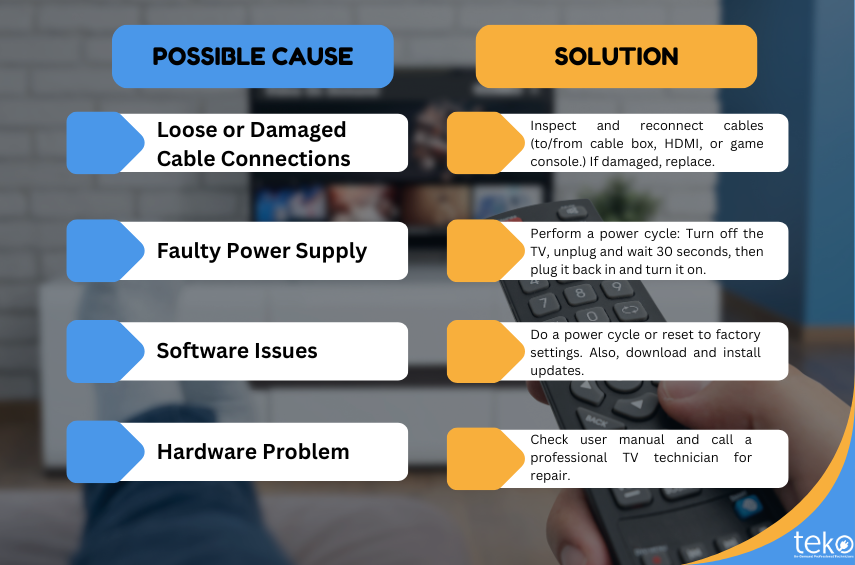
One of the most common causes of a TV black screen is loose connections. Ensure all cables are securely plugged into the correct ports. Sometimes, a simple jiggle can resolve the issue.
I once spent hours trying to fix my TV before realizing the HDMI cable was slightly loose. Tightening it brought the picture back instantly.
Power Supply Issues
Another common culprit is power supply issues. Check if your TV is properly plugged into the outlet. Also, inspect the power cord for any visible damage.
A friend of mine had this problem. They discovered their power strip was faulty. Switching to a new power strip solved their black screen issue.
Have you ever faced a black screen on your TV? What was the cause in your case?

Credit: www.youtube.com
Initial Checks
Experiencing a black screen on your TV can be frustrating. Before diving into complex solutions, perform some initial checks. These simple steps can often resolve the issue quickly. Let’s walk through some basic checks to get your TV back in working order.
Check Remote Control
First, examine your remote control. Ensure the batteries are working. Replace them if necessary. Sometimes, a non-responsive remote can cause the TV to appear dead. Also, check if any buttons are stuck. This might hinder the remote’s performance.
Inspect Power Cord
Next, inspect the power cord. Make sure it is securely plugged into the TV and the wall outlet. A loose connection can disrupt power flow. Look for any visible damage on the cord. If you see frays or cuts, replace the power cord immediately. This ensures your TV receives a steady power supply.
Resetting The Tv
Sometimes, the TV screen goes black without warning. This can be frustrating. But, before you panic, try resetting your TV. Resetting can solve many common issues. There are two types of resets: soft reset and hard reset. Both methods are simple and effective. Let’s explore each one in detail.
Soft Reset
A soft reset is the easiest method. First, turn off your TV using the remote. Next, unplug the TV from the power source. Wait for about 60 seconds. During this time, the TV will clear its memory. Now, plug the TV back into the power source. Turn the TV on using the remote. Check if the black screen issue is resolved.
Hard Reset
If the soft reset does not work, try a hard reset. A hard reset restores the TV to its factory settings. This method can fix more severe issues. To perform a hard reset, locate the reset button on your TV. You might need a paperclip to press it. Hold the reset button for 10-15 seconds. The TV will restart and return to its original settings. After the TV restarts, check if the black screen problem is gone.
Cable And Input Issues
Experiencing a black screen on your TV can be frustrating. Often, the issue lies with the cables and input sources. Ensuring these components are properly connected and functioning can resolve the problem quickly. Let’s dive into the steps to fix cable and input issues.
Verify Hdmi Connections
First, check your HDMI connections. Unplug the HDMI cable from both the TV and the device. Inspect the cable for any visible damage. If the cable looks fine, plug it back in securely. Make sure it clicks into place on both ends. This simple step can often restore the picture on your screen.
Switch Input Sources
Next, switch the input sources on your TV. Use your remote to navigate to the input or source button. Select a different input source than the current one. Wait a few seconds. Then, switch back to the original input source. This can help reset the connection and bring your screen back to life.
Firmware Updates
Firmware updates can often fix a TV black screen issue. These updates improve the TV’s software, ensuring it runs smoothly. Regular updates can prevent many problems, including screen blackouts. Below are the steps to check and install firmware updates on your TV.
Check For Updates
First, ensure your TV is connected to the internet. Most smart TVs need an online connection for updates. Go to the settings menu on your TV. Look for a section labeled “Support” or “System.” Here, you will find an option to check for updates. Select it to see if any new firmware is available.
Install Updates
If an update is available, follow the prompts to download and install it. The TV may restart during this process. Do not turn off the TV while the update is in progress. Once complete, the TV should run the latest firmware. This can often resolve the black screen issue.
Backlight Problems
Dealing with a TV black screen can be frustrating. One of the common reasons behind this issue is backlight problems. The backlight is what illuminates your TV screen, making the images visible. When it fails, you might still hear sound, but the screen remains dark. Fortunately, there are ways to diagnose and potentially fix this issue.
Test Flashlight Method
Ever wondered if your TV is on, but the backlight is just not working? The flashlight method can help you find out. Turn on your TV and grab a flashlight. Shine it at the screen at a close distance.
Look closely. If you see faint images or text, it confirms that the backlight is the problem. This means your TV is receiving the signal correctly, but the light to display it is missing.
This simple test can save you a lot of time. Instead of troubleshooting other components, you can focus on the backlight system.
Professional Repair
If the flashlight test reveals backlight issues, it might be time to consider professional repair. Replacing the backlight is not a DIY-friendly task for most people. It involves opening up the TV and handling delicate components.
Professional technicians have the tools and expertise to fix this safely. They can replace the faulty backlight or diagnose if there’s another underlying issue. While it might cost a bit, it often extends the life of your TV.
Have you ever tried fixing a backlight issue yourself? Or have you always opted for professional help? Share your experiences and let’s see which approach works best for others.
Screen Damage
Screen damage is one of the most common reasons for a TV black screen. Physical harm to the TV screen can render it useless, leaving you in a frustrating situation. Understanding how to address screen damage can save you time and money.
Physical Inspection
First, examine your TV screen for any visible damage. Look closely for cracks, scratches, or any signs of impact.
If you find any, you might recall a moment when something hit the screen. Maybe it was an accidental bump or a playful pet. Identifying the cause can help you determine the best course of action.
Next, check the edges of the screen. Sometimes, damage may not be immediately obvious. Use a flashlight if necessary to spot any hidden cracks.
Repair Or Replace
If the damage is minor, you might be able to repair it. There are repair kits available for small scratches and cracks. These kits often include a solution and a set of tools to fix minor issues.
However, if the damage is extensive, you may need to consider replacing the screen. This can be costly, but it might be the only solution. Call a professional to get a quote and compare it with the cost of a new TV.
Have you ever had to deal with a black screen due to screen damage? What steps did you take to fix it? Share your experiences in the comments below!
Credit: teko.ph
Seeking Professional Help
So, you’ve tried all the DIY fixes for your TV’s black screen issue, but nothing seems to work. It’s time to consider seeking professional help. Let’s dive into the specifics of when and how to get the right technician for the job.
When To Contact A Technician
If your TV remains unresponsive after checking all cables and connections, it’s a clear sign to contact a technician. Strange noises or smells coming from your TV can also indicate a serious issue that needs expert attention. Don’t ignore these signs, as delaying repairs could result in more damage and higher costs.
Another indicator is if your TV screen intermittently goes black but the sound continues. This could point to a problem with the display panel or internal circuits. A professional can diagnose and fix these issues accurately.
Choosing A Repair Service
Finding the right repair service is crucial for a hassle-free experience. Start by reading online reviews and ratings for local repair services. Look for feedback on their expertise, reliability, and customer service.
Check if the repair service is authorized by your TV’s manufacturer. Authorized service centers often have access to genuine parts and specific training for your TV model, ensuring quality repairs.
Ask for a detailed estimate before committing to any service. This should include costs for parts and labor. Transparent pricing will help you avoid unexpected charges and ensure you’re getting a fair deal.
Have you ever had to call a technician for a TV issue? What was your experience like? Share your story and help others make informed decisions.
Credit: teko.ph
Frequently Asked Questions
How Do You Fix A Tv That Turns On But The Screen Is Black?
Check the TV’s input source, cables, and connections. Restart the TV and perform a factory reset. Seek professional help if the issue persists.
Why Is My Tv Turning On But The Picture Is Dark?
Your TV picture may be dark due to backlight issues, incorrect picture settings, or a faulty screen. Adjust brightness and contrast settings, or check for hardware problems.
Why Is My Tv Screen Black But I Have Sound?
Your TV screen might be black due to a faulty HDMI cable, loose connections, or a malfunctioning backlight. Check cables and connections first.
Can A Black Screen Be Fixed?
Yes, a black screen can be fixed. Check connections, reboot your device, update drivers, or consult a technician.
Conclusion
Fixing a TV black screen can be simple with the right steps. Start by checking all connections. Ensure cables are secure and undamaged. Try resetting your TV to factory settings. This can often solve many issues. If the problem persists, consult your TV’s manual.
Seek professional help if needed. Regular maintenance can prevent many common TV problems. Keep these tips in mind for a clear screen. Enjoy your shows without interruptions. Your TV should now work perfectly. Happy viewing!

“I’m someone who loves trying out all the newest tech gadgets! I spend a lot of time testing things like phones, tablets, and computers & accessories. I look at everything carefully and tell you exactly what I think, good or bad. I’ve been doing this for a long time, so I know a lot about how these things work. I want to help you decide if a gadget is really worth your money!”