

You should replace laptop thermal paste every 2 to 3 years. This keeps your laptop running cool and prevents overheating.
Laptops generate heat during use, which can damage internal components over time. Thermal paste helps transfer heat from the CPU and GPU to the heatsink. Over time, the paste dries out and loses its effectiveness. Replacing it ensures your laptop stays cool and runs efficiently.
Regular maintenance like this can extend your laptop’s lifespan. Understanding when and why to replace thermal paste can save you from costly repairs. This guide will explain the importance of thermal paste and how often you should replace it. Let’s dive in and keep your laptop in top shape.

Credit: www.youtube.com
Importance Of Thermal Paste
The thermal paste inside your laptop plays a vital role. It ensures your device functions optimally by helping manage heat. Without it, your laptop’s performance can suffer.
Role In Heat Management
Thermal paste fills tiny gaps between the CPU and its cooler. These gaps can trap air, which is a poor heat conductor. The paste improves heat transfer from the CPU to the cooler.
This keeps the CPU at a safe temperature. Effective heat management prolongs the lifespan of your laptop. It also prevents overheating, which can lead to hardware damage.
Impact On Laptop Performance
If the thermal paste degrades, heat transfer efficiency drops. This can cause the CPU to throttle, reducing performance. High temperatures can slow down your laptop significantly.
Replacing old thermal paste can restore optimal performance. It helps maintain a smooth and fast computing experience. Regular replacement ensures your laptop runs as it should.

Credit: koolingmonster.com
Signs Of Degraded Thermal Paste
Experiencing frequent laptop overheating? Notice the fan running louder than usual? These could be signs of degraded thermal paste.
When your laptop starts acting up, it might be due to degraded thermal paste. This seemingly small component is crucial for keeping your laptop’s temperature in check. Recognizing the signs of degraded thermal paste can save you from bigger issues down the line.
###
Overheating Issues
One of the most obvious signs of degraded thermal paste is overheating. If your laptop frequently feels hot to the touch, that’s a red flag. When I noticed my laptop fan running constantly and the base getting too warm, I knew it was time to check the thermal paste.
Overheating can lead to unexpected shutdowns. This is your laptop’s way of protecting itself from potential damage. If you find your laptop shutting down in the middle of tasks, it’s likely the thermal paste isn’t doing its job.
###
System Slowdowns
Another sign to watch for is a noticeable slowdown in performance. If your laptop takes forever to open applications or files, degraded thermal paste could be the culprit. High temperatures can throttle your CPU performance, making everything run slower.
When my laptop started lagging during simple tasks, I realized something was off. After replacing the thermal paste, the speed and responsiveness improved significantly. This simple fix can make a world of difference.
Have you checked your thermal paste lately? Keeping an eye on these signs can help you maintain your laptop’s health and extend its lifespan. Don’t wait until it’s too late—regular maintenance can keep your device running smoothly.
Factors Affecting Thermal Paste Lifespan
Laptop thermal paste lifespan depends on factors like usage intensity, environmental conditions, and thermal paste quality. Regularly checking and replacing it every 2-3 years ensures optimal performance.
Factors Affecting Thermal Paste Lifespan
Thermal paste plays a crucial role in maintaining your laptop’s performance. It ensures efficient heat transfer between the CPU and the heat sink. Over time, thermal paste can degrade, impacting your laptop’s cooling. Several factors affect how often you should replace thermal paste.
Usage Intensity
How you use your laptop greatly affects thermal paste lifespan. Heavy usage, such as gaming or video editing, generates more heat. This can cause the thermal paste to dry out faster. On the other hand, light usage, like browsing or document editing, generates less heat. This means the thermal paste lasts longer.
Environmental Conditions
Environmental conditions also play a significant role. High ambient temperatures can accelerate thermal paste degradation. Dust and humidity can also affect the paste’s performance. Keeping your laptop in a clean, cool environment helps maintain thermal paste integrity.
Recommended Replacement Intervals
Laptop thermal paste should be replaced every 1-2 years. Regular replacements ensure optimal cooling performance and prevent overheating. Keeping your laptop in good condition extends its lifespan.
Recommended Replacement Intervals
Knowing when to replace your laptop’s thermal paste is crucial for maintaining optimal performance. Thermal paste helps to transfer heat from the CPU or GPU to the heatsink, preventing overheating. But how often should you replace it?
###
General Guidelines
Most experts suggest replacing thermal paste every two to three years. This interval ensures that the thermal paste remains effective in heat dissipation. If your laptop is used heavily for gaming or intensive tasks, consider doing it more frequently.
If you notice your laptop running hotter than usual, it might be time for a replacement. High temperatures can throttle performance and damage internal components. Regular checks can help you avoid these issues.
###
Manufacturer Advice
Always check your laptop’s manual or the manufacturer’s website for specific advice. Some manufacturers provide guidelines on thermal paste replacement intervals. They might recommend a different timeframe based on the type of thermal paste used or the design of the cooling system.
For instance, Dell and HP often suggest a 3-5 year interval, while gaming laptops like those from ASUS ROG might need more frequent maintenance. Following the manufacturer’s advice ensures you’re keeping your device in the best possible condition.
Have you ever replaced your laptop’s thermal paste? How did it impact your device’s performance?
Choosing The Right Thermal Paste
Choosing the right thermal paste is crucial for your laptop’s performance. Thermal paste helps transfer heat from the CPU to the heatsink. This keeps your laptop cool and running efficiently. But with so many options available, how do you choose the right one? Let’s explore the types available and some top brands.
Types Available
There are several types of thermal pastes. The most common types are silicone-based, ceramic-based, and metal-based.
Silicone-based pastes are easy to apply. They are also affordable. They offer decent performance for regular use.
Ceramic-based pastes have better heat conductivity. They are non-conductive, making them safe to use. Ideal for those who prioritize safety and performance.
Metal-based pastes offer the best thermal conductivity. They contain metals like silver or aluminum. These are great for high-performance laptops. But they can be conductive, so apply with care.
Top Brands
Several brands are known for their quality thermal pastes. Arctic is a popular choice. Their MX-4 paste is well-regarded. It offers excellent performance and is easy to apply.
Another top brand is Noctua. Their NT-H1 paste is favored by many. It is reliable and long-lasting. A good option for those seeking durability.
Cooler Master also makes great thermal pastes. Their MasterGel series is highly effective. It provides excellent thermal conductivity. Perfect for high-performance needs.
Lastly, Thermal Grizzly is highly recommended. Their Kryonaut paste is top-notch. It offers extreme performance. Ideal for overclocking and gaming laptops.
Steps To Replace Thermal Paste
Replacing laptop thermal paste every 1-2 years can help maintain optimal performance. Regularly check for signs of overheating or reduced efficiency. Follow simple steps to ensure a smooth and effective process.
Replacing the thermal paste on your laptop can significantly improve its performance and lifespan. Many people overlook this crucial maintenance step, but it’s simpler than you might think. Let’s dive into the steps to replace the thermal paste on your laptop.
Preparation
Before you start, gather your tools. You’ll need thermal paste, a screwdriver set, isopropyl alcohol, cotton swabs, and a clean cloth.
Ensure your workspace is clean and well-lit. This helps prevent dust from contaminating the thermal paste.
Back up your data. Although rare, something could go wrong, and it’s better to be safe than sorry.
Application Process
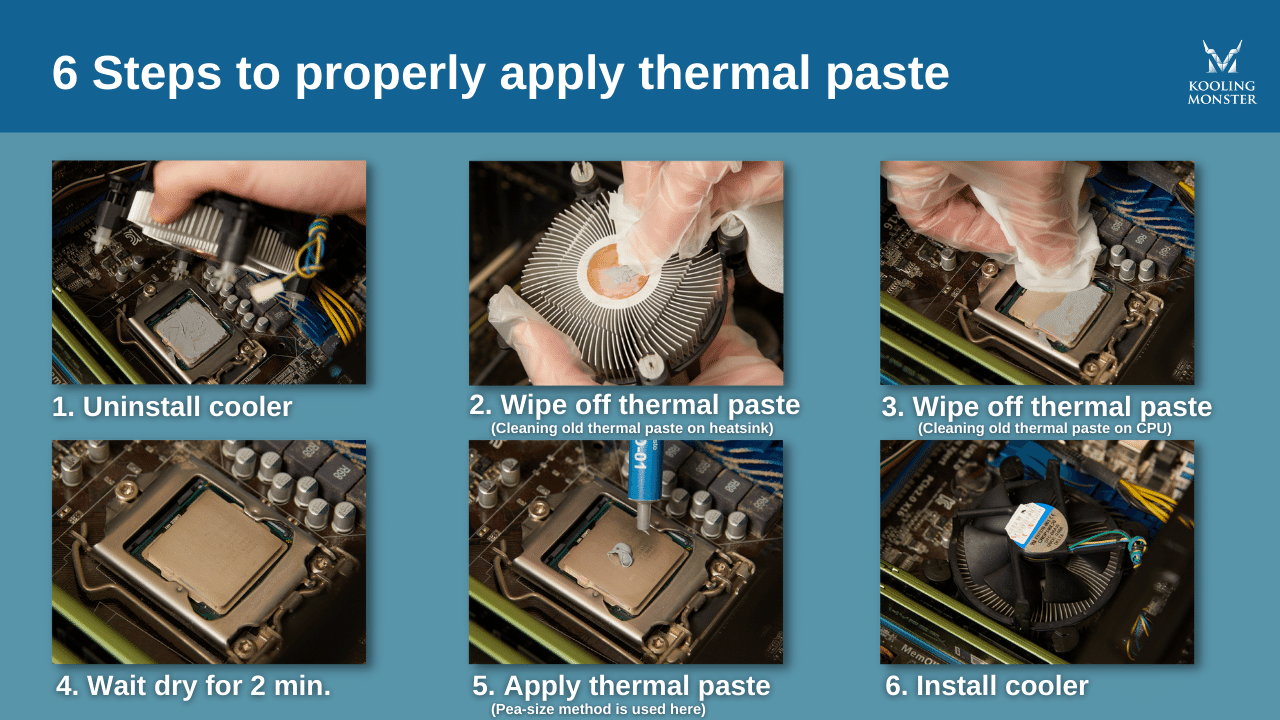
First, disconnect your laptop from any power source. Remove the battery if possible. This prevents any accidental short circuits.
Unscrew the back panel to access the motherboard. Locate the CPU and GPU—they are usually under a cooling fan or heat sink.
Use cotton swabs dipped in isopropyl alcohol to carefully clean off the old thermal paste. Make sure you remove all residues for the best results.
Apply a small amount of new thermal paste onto the center of the CPU and GPU. A pea-sized dot is usually sufficient. Spread it evenly using a clean cloth or a plastic spatula.
Reassemble the laptop by screwing back the panel. Reconnect the battery and power up your laptop. Notice any immediate improvements in performance?
Replacing thermal paste is not rocket science. Have you ever tried it? What challenges did you face? Sharing your experiences can help others tackle this task with confidence.
Preventing Thermal Paste Degradation
Replacing laptop thermal paste every 1-2 years helps prevent thermal paste degradation. Regular maintenance ensures efficient cooling and extends the laptop’s lifespan.
Preventing Thermal Paste Degradation is crucial for maintaining your laptop’s performance. Thermal paste plays a significant role in keeping the CPU cool by transferring heat to the heatsink. Over time, thermal paste can degrade, leading to overheating issues. Let’s explore how you can prevent this degradation effectively.
Proper Maintenance
Regular maintenance is key to preventing thermal paste degradation. Clean your laptop’s vents and fans to ensure good airflow. Dust buildup can cause the CPU to overheat, accelerating thermal paste breakdown.
Additionally, monitor your CPU temperatures. If you notice a consistent rise, it may be time to check the thermal paste. Replacing it every 1-2 years can help maintain optimal performance.
Optimal Storage
Storing your laptop properly also impacts thermal paste longevity. Avoid placing your laptop in areas with extreme temperatures. High heat can cause the thermal paste to dry out faster.
If you often carry your laptop around, use a padded case. This minimizes physical shocks that could displace the thermal paste. Proper storage ensures your thermal paste remains effective longer.
Have you ever noticed your laptop getting unusually hot? Regular checks and good storage practices can prevent such issues. Remember, a cool laptop is a happy laptop!
Expert Tips And Best Practices
Replacing laptop thermal paste is key to maintaining optimal performance. Over time, thermal paste dries out. This can cause your laptop to overheat. Follow these expert tips and best practices to ensure your laptop stays cool and runs efficiently.
Common Mistakes To Avoid
Avoid using too much thermal paste. A small amount is sufficient. Excess paste can cause overheating. Also, do not use cheap or low-quality thermal paste. It may not transfer heat effectively. Always clean the old paste thoroughly. Residue can reduce the efficiency of the new paste. Finally, do not rush the process. Take your time to apply the paste evenly. An uneven application can lead to hot spots.
Enhancing Longevity
Regularly check your laptop’s temperature. High temperatures can indicate the need for new thermal paste. Replace the paste every two to three years for best results. Also, keep your laptop clean. Dust can block airflow and cause overheating. Use high-quality thermal paste. This can provide better heat transfer and longer-lasting performance. Lastly, ensure proper ventilation. Use a cooling pad to help keep temperatures down.
Credit: koolingmonster.com
Frequently Asked Questions
How Long Does Thermal Paste Last On A Laptop?
Thermal paste typically lasts 3-5 years on a laptop. Replace it if you notice overheating or performance issues. Regular maintenance ensures optimal cooling.
How To Know If Laptop Needs Thermal Paste?
Check if your laptop overheats, shows high CPU temperatures, or shuts down unexpectedly. These signs suggest it may need new thermal paste.
How Often Should I Repaste A Laptop?
Repaste your laptop’s thermal paste every 2-3 years. Replace sooner if you notice overheating or performance issues.
How Often Should You Change Laptop Thermal Paste On Reddit?
Change laptop thermal paste every 1-2 years. Heavy users or those in warm environments may need to do it more often.
Conclusion
Regularly replacing laptop thermal paste ensures optimal performance and longevity. Typically, every 1-2 years is ideal. Monitor your laptop’s temperature for signs. High heat signals the need for new paste. This simple step prevents overheating. It also maintains speed and efficiency.
Consistent maintenance protects your investment. It’s an easy task with big benefits. Keep your laptop cool. Stay proactive and enjoy a smoother experience.

“I’m someone who loves trying out all the newest tech gadgets! I spend a lot of time testing things like phones, tablets, and computers & accessories. I look at everything carefully and tell you exactly what I think, good or bad. I’ve been doing this for a long time, so I know a lot about how these things work. I want to help you decide if a gadget is really worth your money!”